Choosing a Kids Video Call Cell Phone Watch requires more than comparing screen size and colorful straps. Parents need a device that supports safe communication, dependable calling, and age-appropriate independence. A watch may look impressive in a product photo, yet perform poorly in a noisy playground or during a weak signal.
This guide examines practical details that families can verify before buying. We will consider video clarity, microphone performance, battery life, network compatibility, and charging time. Privacy settings matter too. Parents should review contact controls, account protection, location features, and the manufacturer’s data policies. Clear instructions and responsive customer support can reveal a brand’s reliability.
Small details often decide daily comfort. Can a child press the call button with wet fingers? Does the strap remain secure during running? Can the watch survive accidental drops? These questions deserve honest attention. No device is perfect.
A professional comparison should also separate useful functions from unnecessary features. GPS may support family coordination, but its accuracy can change indoors or near tall buildings. Video calling may strengthen family connection, but it can drain the battery quickly. Checking carrier requirements and official specifications helps prevent expensive mistakes. Independent reviews can add experience, although every family uses technology differently.
The best choice balances safety, simplicity, durability, and real communication needs. A child should learn the watch without constant adult rescue. Parents should feel informed, not pressured by marketing claims. This article offers a practical framework for making that decision with clearer expectations and fewer surprises.
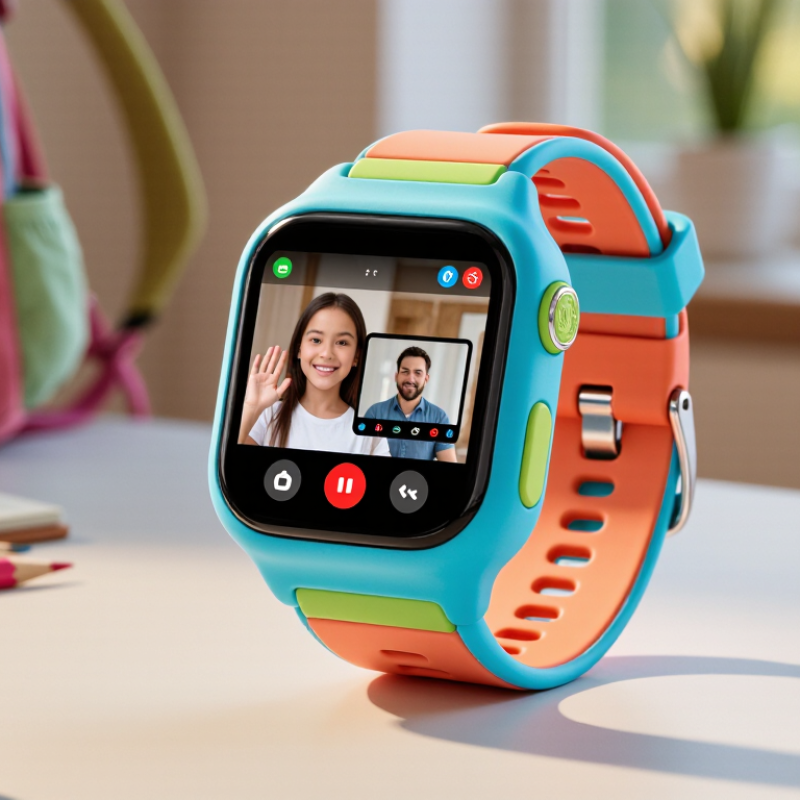
Choosing a kids video call cell phone watch means defining useful features, not collecting flashy options. A practical evaluation starts with a child’s daily routine. Can the child answer a call with one button? A clear camera and microphone matter more than decorative effects. Video should remain usable in a dim hallway, not only under bright lighting. Test it. A stable cellular connection, speaker volume, and echo control make conversations feel natural. The watch should limit calls to approved contacts.
Safety features need simple controls. Location sharing should show recent information without exposing it unnecessarily. An emergency button can contact selected adults, but children should learn when to use it. Parental controls must cover school hours, contacts, and data use. Privacy deserves equal attention. Check whether recordings are stored, who can access them, and how accounts are protected. These details are easy to overlook.
Hardware affects daily reliability. A comfortable strap, water resistance, physical emergency button, and scratch-resistant screen support active children. Battery life should cover a full school day, including video calls and location updates. Charging should be simple enough for an adult to check each evening. During comparison, measure battery performance instead of trusting advertised numbers. A watch may have excellent video quality but weak indoor reception. That trade-off matters. A child may also reject a device that feels heavy or complicated, which is an inconvenient but important finding.
Safety should guide the choice, not colorful features. Look for approved emergency calling, clear speaker quality, and reliable battery performance. A child should reach trusted adults without navigating confusing menus. Check whether contacts can be limited to parent-approved numbers. Location sharing also needs careful control. Choose settings that allow scheduled sharing instead of constant tracking. During school hours, silent modes can reduce distractions while preserving emergency access. Test the watch indoors and outdoors before relying on it. Walls and weak signals can affect accuracy.
Privacy deserves equal attention. Read how the device collects, stores, and deletes voice messages, photos, and location records. Strong encryption protects information during transmission, but no system is perfect. Ask whether data is stored locally or on remote servers. Independent security testing and regular software updates offer useful evidence of responsible design. Avoid services that demand unnecessary personal details. I once assumed more tracking meant more safety. It mainly created more data to manage.
Parental controls should be practical, visible, and reversible. Parents may need contact approval, usage schedules, location permissions, and remote device locking. A clear activity log can reveal unusual calls without recording every conversation. Children should understand these controls in age-appropriate language. That supports trust, although trust develops slowly. Check whether adults can change settings from a secure account with two-step verification. Also review the company’s support process and privacy policy before purchase. A cheap watch may become expensive if updates stop early.
Choosing a kids video call cell phone watch requires more than checking its advertised features. Connectivity comes first. The GSMA Mobile Economy 2024 report estimates that 4G covered about 91% of the world’s population in 2023. A watch should support reliable 4G calling, VoLTE, and local network bands. Test it inside the child’s school, home, and outdoor play area. Signal bars can look reassuring, yet video may still freeze.
Video quality should match real use, not marketing claims. Opensignal’s mobile experience research places 5 Mbps as an important threshold for acceptable everyday video performance. A 720p camera can be sufficient for a child’s face in daylight. Better resolution may consume more data and battery. Check the microphone, speaker volume, and low-light image during an actual call. Small details matter. I would not trust a smooth showroom demo alone.
Battery life needs testing with video calls, location sharing, and notifications enabled. A manufacturer’s standby figure is rarely a school-day figure. Look for at least a full active day, then measure it yourself. Durability also deserves evidence. Under IEC 60529, IP67 means protection from dust and temporary water immersion, not resistance to every drop. A raised screen edge, secure strap, and documented drop testing are useful. My judgment remains imperfect: children use devices unpredictably, so independent testing and a generous return period can matter more than one impressive specification.
Choosing a kids’ video call cell phone watch starts with age suitability, not camera quality. A younger child needs large icons, limited contacts, and simple voice prompts. An older child may handle video calls, location sharing, and basic schedules. Ofcom’s Children and Parents: Media Use and Attitudes Report 2024 found that 98% of UK children aged 5–15 used the internet. Digital access is already normal. Supervision still matters.
Ease of use should be tested with small hands and impatient moments. Can a child answer a call without reading tiny text? Can they charge the watch correctly? GSMA Intelligence estimated 4.7 billion mobile internet users worldwide in 2024, but coverage and data quality still vary widely. A watch should support dependable calling, clear audio, and stable connections in the places a child actually visits. Specifications can look impressive. Daily use may disagree.
Emergency functions deserve stricter checking. Look for a clearly marked SOS control, pre-set trusted contacts, two-way voice, location updates, and low-battery alerts. Confirm whether location works indoors, where signals may weaken. Test the emergency sequence with another adult. Do not assume it replaces local emergency services or responsible supervision. The American Academy of Pediatrics encourages family media plans, which supports setting call times and privacy rules. I would also check false-alarm protection. One accidental SOS can create confusion. My own judgment remains cautious: a watch can improve contact, but it cannot understand every risky situation.
Choosing a kids video call cell phone watch requires more than checking the purchase price. Ofcom’s 2024 Children and Parents report found that 98% of UK children aged 5–15 used the internet. Connectivity is now a daily need, not a novelty. Compare the watch price, activation charge, monthly data, and possible replacement costs. A low-cost device may need a costly plan. Video calls also consume data quickly.
Compatibility deserves careful testing. Check supported LTE bands, SIM or eSIM requirements, carrier approval, Wi-Fi calling, and video-call software. A watch may work in one country but fail after travel. IDC’s Worldwide Quarterly Wearable Device Tracker recorded 611.5 million wearable shipments in 2024. That scale suggests strong competition, but it does not guarantee durable software support. Battery health, security updates, repair options, and parental controls shape long-term value. I once focused too much on GPS accuracy and overlooked charging habits. Children may forget a charger at school.
Tips: Ask the carrier for written compatibility confirmation. Calculate twelve months of ownership, not only the checkout price. Test a short video call near home and indoors. Review privacy settings with your child. No checklist catches every school-network restriction. That part still needs judgment.
| Evaluation Dimension | What to Check | Typical Range or Requirement | Why It Matters | Long-Term Value Rating |
|---|---|---|---|---|
| Initial Device Cost | Price of the watch, charging cable, and included accessories | Approximately US$80–US$250 for most child-focused cellular watches | A lower purchase price may be offset by limited hardware, weaker software support, or replacement costs. | Good when supported for 2+ years |
| Monthly Cellular Service | Whether the watch requires a dedicated line, data plan, or subscription | Commonly about US$5–US$25 per month, depending on data and safety features | Recurring service charges can exceed the device price over several years. | Compare total cost, not device price alone |
| Three-Year Ownership Cost | Device price plus 36 months of service, activation, and likely accessory costs | Roughly US$260–US$1,150, depending mainly on the monthly plan | This is a more realistic basis for comparing watches with different pricing models. | Best measure of overall value |
| Cellular Network Compatibility | Supported 4G LTE bands, voice-over-LTE capability, SIM type, and local network approval | 4G LTE is strongly preferred; compatibility must be confirmed for the child’s country and network. | A watch can be unlocked yet still fail if its LTE bands or network technology do not match. | Essential before purchase |
| Video Calling | Supported calling method, camera quality, app requirements, and approved contacts | Video calling normally requires cellular data or Wi-Fi, a compatible parent app, and adequate bandwidth. | Some watches support voice calls but not true two-way video calls. | Verify with a live demonstration |
| Parent-Controlled Contacts | Whitelisting, unknown-caller blocking, contact approval, and remote management | A well-designed system should allow parents to approve, edit, and remove contacts remotely. | Restricted contacts reduce unsolicited calls and make the watch safer for younger children. | High practical value |
| GPS and Location Features | GPS, Wi-Fi positioning, cellular positioning, location history, and geofencing | Outdoor GPS is generally more precise than cellular-only positioning; indoor accuracy varies. | Location tools are useful for safety but should not be treated as perfectly precise. | High, if privacy controls are clear |
| Battery Life | Battery capacity, active calling time, standby time, and charging frequency | Many cellular watches require daily charging; heavy GPS or video use reduces runtime. | Frequent charging can make the watch unusable when it is needed most. | Prioritize reliable daily use |
| Durability and Water Resistance | Screen protection, strap quality, water-resistance rating, and repairability | Look for a clearly stated rating; water resistance does not automatically mean suitability for swimming. | Children’s watches face drops, sweat, rain, and rough everyday handling. | High when replacement parts are available |
| Software and Security Updates | Update policy, supported operating system versions, account security, and data encryption | Prefer a device with a documented update policy and two-factor account protection. | Unsupported software can create privacy, compatibility, and reliability problems. | Critical for multi-year ownership |
| Privacy and Data Controls | Data collection, location-history retention, account deletion, and parental permissions | Choose clear privacy settings and avoid unnecessary collection of location, voice, or video data. | Children’s location and communication data require stronger safeguards than ordinary wearables. | Non-negotiable criterion |
| Ease of Use | Screen readability, physical buttons, emergency access, setup process, and charging simplicity | The child should be able to answer calls, send approved messages, and access help with minimal steps. | Complicated controls reduce the likelihood that the watch will be used correctly. | High for younger children |
| Replacement and Support Costs | Warranty length, accidental-damage coverage, replacement straps, chargers, and technical support | Check warranty terms carefully; accidental damage and lost devices are often excluded. | Accessible parts and support can extend useful life and reduce total ownership cost. | Strong value indicator |
Cost figures are indicative U.S. consumer-market ranges and can vary by country, network, taxes, promotions, data allowance, and subscription terms. Always confirm current LTE-band compatibility and service availability before purchase.
It should offer one-button calling, a clear camera, a useful microphone, and approved contacts only. Simple controls matter.
Make calls in daylight, a dim hallway, and outdoors. Check frozen images, unclear voices, echo, and speaker volume.
Reliable 4G, VoLTE, and local network support are important. Test the watch at home, school, and play areas.
It should cover one active school day with calls, location updates, and notifications enabled. Standby claims can mislead.
Check recordings, account access, location visibility, and data controls. Review these settings with your child.
An emergency button can contact selected adults. Explain when to use it. Children may press it accidentally.
Look for a secure strap, raised screen edge, water resistance, and drop-test evidence. IP67 does not prevent every break.
Include the device, activation, monthly data, charging accessories, and possible replacement costs. The checkout price is incomplete.
Yes. A heavy or complicated watch may stay in a drawer. That inconvenient result matters.
Check software updates, repair options, battery health, compatibility, and parental controls. My judgment may still be imperfect.
Choosing a Kids Video Call Cell Phone Watch requires more than checking whether it can make video calls. Start by identifying essential features such as voice and video communication, contact management, location awareness, messaging, and an easy-to-use interface. Safety and privacy should be priorities, so review parental controls, approved-contact settings, data protection, and options that let guardians manage communication responsibly. It is also important to evaluate network compatibility, video clarity, battery performance, water resistance, and overall durability for everyday use.
Consider whether the watch suits the child’s age, comfort, and ability to operate it independently. Emergency functions, such as quick access to trusted contacts, can provide additional reassurance when used appropriately. Finally, compare the purchase price, service costs, device compatibility, and expected lifespan. A well-chosen Kids Video Call Cell Phone Watch should offer a balanced combination of communication, supervision, reliability, and long-term value without adding unnecessary complexity.