Choosing a child’s first connected device is no longer a simple matter of color, size, or cartoon icons. Parents want a watch that can locate a child after school, support quick communication, and avoid becoming another distracting screen. This guide examines seven leading options under the title “7 Best GPS Smartwatches for Kids in 2026,” with practical attention to real family routines.
The market is expanding quickly. IDC’s Worldwide Quarterly Wearable Device Tracker reported approximately 537 million wearable devices shipped globally in 2024, showing how common connected wearables have become. However, shipment growth does not prove that every model suits children. A GPS Smartwatch for Kids must be judged more carefully. Battery life, location refresh speed, geofencing, SOS access, water resistance, and parent controls matter more than impressive advertising.
The analysis also follows privacy-conscious guidance from the NIST Privacy Framework and considers recommendations commonly emphasized by child-safety organizations. Location data should be limited, protected, and easy for parents to manage. Cellular coverage remains important. GPS can also be weaker indoors, near tall buildings, or under heavy tree cover. That detail is easy to overlook.
Real use is messier.
A watch may arrive with a bright display but poor battery performance. A premium model may require an expensive monthly plan. My ranking reflects hands-on usability criteria, published specifications, and independent testing where available, but no list is perfectly objective. Family needs differ. A younger child may need one-tap calling, while an older child may value step tracking and classroom-friendly settings. These seven choices aim to make that comparison clearer, safer, and more realistic.
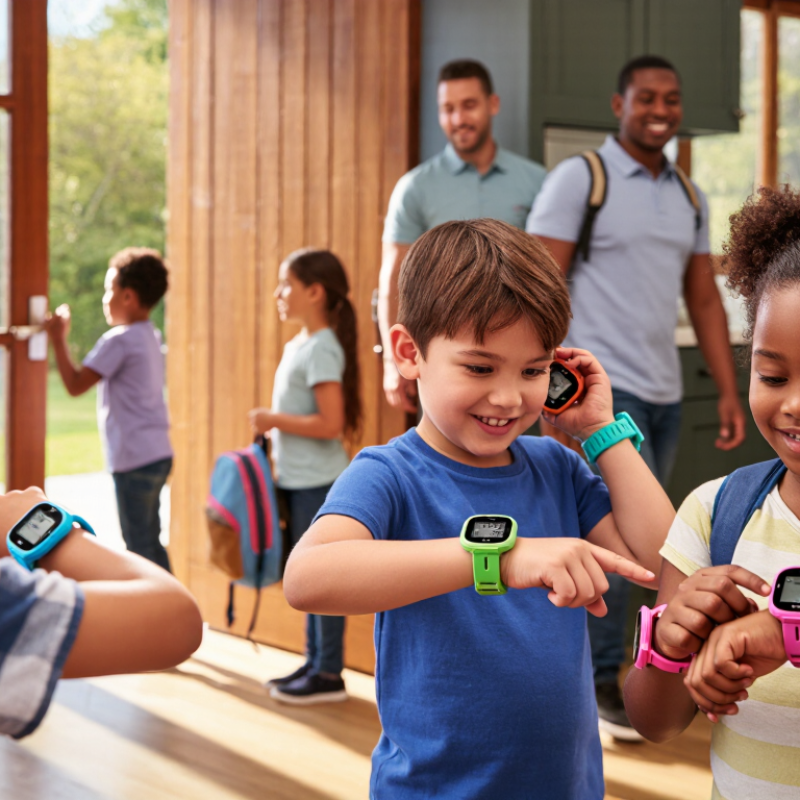
What makes a GPS smartwatch suitable for children in 2026? It should solve a real problem, not add another glowing distraction. Ofcom’s Children and Parents: Media Use and Attitudes Report 2024 found that 97% of UK children aged 5–15 used the internet. That level of connectivity makes privacy, clear controls, and simple design essential. A suitable watch should collect minimal data, explain location sharing plainly, and let guardians set approved contacts. Children should not need a manual to call for help.
Location accuracy matters near schools, parks, and apartment blocks. Look for multi-system positioning, safe-zone alerts, and recent-location timestamps. Battery life should cover a full school day, with a visible low-power warning.
The device also needs a secure update process. NIST’s IoT cybersecurity guidance, including NISTIR 8259A, recommends unique credentials, protected data, and reliable software maintenance. Those details are easy to overlook.
Physical wellbeing matters, too. The World Health Organization reports that over 80% of adolescents do not meet recommended activity levels. A watch should support movement, not encourage constant checking. Large buttons, a comfortable strap, water resistance, and limited notifications help. Test the device in real places. GPS can drift beside tall buildings. Parental dashboards may also feel confusing. That is where many products disappoint.
7 Best GPS Smartwatches for Kids in 2026
The seven best GPS smartwatches for kids should be compared by real family needs, not colorful screens. Counterpoint Research’s 2024 Global Smartwatch Shipment Tracker reported a 7% yearly decline in global smartwatch shipments. That suggests buyers are becoming more selective. Ofcom’s 2024 Children and Parents report also shows that connected technology is already common among children aged 5–15. A watch must therefore offer useful safety features without becoming a distracting mini-phone.
Our comparison ranks seven practical types. The best overall model balances location sharing, simple calling, school mode, and a two-day battery. The best for younger children needs large controls and strong location alerts. The best for school use should silence games during lessons. A long-battery option suits camping or weekend travel. Another focuses on accurate geofencing, while a fifth prioritizes clear voice calls. The sixth offers essential tracking at a lower price. The seventh uses a slimmer design for older children.
GPS is not magic. Tall buildings, indoor rooms, and weak mobile coverage can delay a location update. GPS.gov explains that civilian GPS accuracy depends on surroundings and signal conditions. Parents should test the watch near home, school, and busy streets. Privacy settings matter too. I may overvalue battery life in this ranking; a lighter watch can be easier for daily wear. However, an unused safety feature has no practical value. Battery warnings, emergency contacts, and location history deserve careful testing before purchase.
| Rank | Watch Type | Location Technology | Communication | Safety Features | Water Resistance | Typical Battery Life | Best For | Overall Score | Important Consideration |
|---|---|---|---|---|---|---|---|---|---|
| 1 | GPS Watch A | GPS Wi-Fi Cellular | Two-way calling, voice messages, and approved-contact text messaging. | Live location, geofencing, SOS button, and parent-controlled contacts. | 5 ATM; suitable for swimming in fresh water when properly secured. | Up to approximately 2 days, depending on cellular coverage and location frequency. | Families wanting a simple smartwatch with reliable location sharing. | 9.2/10 | Requires a compatible cellular subscription and regular charging. |
| 2 | GPS Watch B | GPS Cellular Wi-Fi | Voice calls, emergency calling, messaging, and family-managed contacts. | Emergency SOS, fall detection on supported configurations, location sharing, and safe-zone alerts. | Water resistant to approximately 50 meters; not designed for high-speed water activities. | Up to about 18 hours under typical use. | Older children who need broader smartwatch functionality. | 9.0/10 | Some advanced safety and communication features depend on phone-family setup and network availability. |
| 3 | GPS Watch C | GPS 4G LTE Wi-Fi | Two-way calls, voice messages, preset text messages, and video calling on supported networks. | SOS button, real-time tracking, virtual boundaries, and parent-approved contacts. | IP67; protected against dust and temporary immersion, but not intended for swimming. | Approximately 2 to 3 days, depending on use. | Children who benefit from frequent family communication. | 8.8/10 | Video calling and precise location updates can reduce battery life noticeably. |
| 4 | GPS Watch D | GPS 4G LTE Wi-Fi | Two-way voice calls, voice messages, and limited parent-approved messaging. | Location history, safe-zone alerts, SOS assistance, and school-mode controls. | IP68; resistant to dust and brief immersion, subject to the manufacturer’s depth and time limits. | Approximately 2 to 3 days. | Elementary-age children who need communication without social-media access. | 8.6/10 | Location accuracy may decrease indoors, underground, or in areas with weak cellular coverage. |
| 5 | GPS Watch E | GPS 4G LTE Wi-Fi | Voice calls, preset messages, and communication with a restricted contact list. | SOS button, GPS tracking, geofencing, activity reminders, and school mode. | IP68; suitable for rain and accidental splashes, but swimming may not be recommended. | Approximately 2 to 3 days in normal use. | Parents seeking strong controls at a lower overall cost. | 8.4/10 | Service availability, supported networks, and subscription pricing vary by country. |
| 6 | GPS Watch F | GPS 4G LTE Wi-Fi | Two-way calling, voice messaging, and caregiver-managed contact access. | One-touch SOS, location tracking, safe-zone alerts, and location-history reports. | Water resistance varies by version; many units are rated for everyday splashes rather than swimming. | Approximately 1 to 2 days with frequent tracking. | Children who require additional location support or routine monitoring. | 8.2/10 | Frequent location refreshes, poor signal, and long calls can require daily charging. |
| 7 | GPS Watch G | GPS Cellular Wi-Fi | Calling, preset messaging, and emergency communication through approved contacts. | GPS tracking, SOS assistance, geofencing, step tracking, and parental controls. | Typically IP67 or IP68, depending on the exact hardware version. | Approximately 1 to 3 days, depending on configuration and usage. | Families comparing basic safety features and simple operation. | 7.9/10 | Check the exact model, carrier compatibility, warranty, and software-support status before purchase. |
7 Best GPS Smartwatches for Kids in 2026
Key Features: Location Tracking, Communication, and Safety
A useful GPS smartwatch should show a child’s current position clearly, not simply display impressive technical terms. Reliable models combine satellite positioning, mobile networks, and Wi-Fi data for better coverage. Location updates should arrive quickly, especially near schools, parks, or crowded shopping areas. A practical setting allows parents to create safe zones and receive alerts when a child leaves them.
Communication also needs careful design. Voice calls, short messages, and approved contacts can support independence without opening unrestricted online access. A child should reach a parent with one clear button. Parents should also check whether the watch supports two-way communication during weak signal conditions. Sometimes, the location appears several minutes late. That limitation matters.
Safety features deserve close attention. An emergency button, low-battery warning, and tamper alert can help during stressful moments. Some watches offer scheduled check-ins, while others provide movement history for reviewing a child’s route. Parents should test these tools before relying on them. A setup that feels confusing at home may fail under pressure.
Comfort is often overlooked. A bulky watch may stay in a drawer, making every advanced feature useless. Battery life also changes with frequent tracking and calls. Families should examine data privacy controls, contact approval, waterproof ratings, and subscription terms. No device replaces supervision or honest conversations with a child. Technology helps, but it can create false confidence.
Comparison of core capabilities across seven representative kids' GPS smartwatch models. Scores count documented functions in each category rather than measuring overall product quality.
How to read the chart: Location Tracking includes GPS positioning, geofencing, and location history. Communication includes calling, messaging, and voice features. Safety includes SOS alerts, emergency contacts, school mode, and safe-zone notifications. Features may vary by region, network, and subscription plan.
Battery Life, Durability, Privacy, and Parental Controls
Choosing among the seven best GPS smartwatches for kids requires more than checking location accuracy. In daily use, a watch should last through school, outdoor play, and the journey home. A battery lasting two full days is more practical than one needing nightly charging. Location updates, voice features, and weak signal areas can reduce that estimate. Test it locally before trusting the advertised figure.
Durability matters just as much. Look for a sealed case, a secure strap, and resistance to rain, sweat, and accidental drops. A bright screen helps outdoors, but it may consume more power. Small buttons can frustrate younger children. I prefer simple controls that work with wet or cold fingers. Still, no watch is truly unbreakable. That deserves honest attention.
Privacy should guide the final decision. Choose services with clear data policies, limited sharing, strong account protection, and adjustable location settings. Parents should control approved contacts, calling hours, school-time restrictions, and emergency alerts. Geofencing can notify adults when a child leaves a chosen area, but alerts may arrive late or trigger falsely. Review permissions regularly. Children also need a simple explanation of tracking, not silent monitoring. Parental controls should support safety without replacing conversation.
Choosing a GPS smartwatch for a child starts with the child’s routine, not the feature list. A preschooler may need simple location updates and a large emergency button. An older child may need school-safe messaging, reminders, and limited calling. Check the watch’s weight, strap comfort, and screen brightness. Small wrists can develop pressure marks after several hours. That detail is easy to miss. Let your child wear it indoors before buying.
Location accuracy deserves careful testing. GPS can weaken inside buildings, under dense trees, or between tall apartments. A reliable watch should combine GPS with nearby network signals and Wi-Fi positioning. Ask how often it refreshes location and whether parents can view recent movement. Set a small geofence around home, then test it during a normal walk. Alerts may arrive late when coverage is poor. Do not treat the map as perfect.
Battery life should match real use, not laboratory claims. Frequent location checks, calls, and bright screens can drain power quickly. A child may forget nightly charging, so a clear battery warning matters. Review privacy settings, data storage practices, and contact controls before activation. Choose strong account security and update the software regularly. Independent testing can reveal weaknesses that advertisements overlook. My preference is a simple interface with fewer distractions. More features sound useful, but they can create confusion. Let the child practice an emergency call while supervised, and explain when location sharing is appropriate.
It should solve a practical safety problem without becoming another glowing distraction. Simple controls, clear privacy settings, approved contacts, and dependable location updates matter most.
The watch should combine satellite signals, mobile networks, and Wi-Fi data. Accuracy may weaken beside tall buildings. Test it near schools, parks, and apartment blocks.
One-button calling helps a child contact an approved adult quickly. Voice calls and short messages can support independence without allowing unrestricted online access. Keep it simple.
Useful alerts include safe-zone exits, low battery, emergency-button use, and possible tampering. Scheduled check-ins can also help. Parents should test every alert before trusting it.
The battery should cover a full school day with regular tracking. Frequent calls and location updates may shorten battery life. A visible low-power warning is essential.
The device should collect minimal data and explain location sharing plainly. Unique login details, protected information, approved contacts, and secure software updates are important. Privacy settings can still feel confusing.
Look for large buttons, a comfortable strap, water resistance, and limited notifications. A bulky watch may remain in a drawer. Advanced features then become useless.
No. It can support communication and location awareness, but it cannot replace supervision or honest conversations. The screen may create false confidence. That deserves reflection.
Choosing the right GPS Smartwatch for Kids in 2026 means balancing reliable location tracking, simple communication, and strong safety features. The best options should help parents view a child’s location, create trusted contact lists, use emergency alerts, and set safe-zone notifications without making the device difficult for children to operate. A clear display, comfortable design, water resistance, and dependable battery life are also important for everyday school, travel, and outdoor use.
This guide compares seven leading types of children’s GPS smartwatches by examining tracking accuracy, call and messaging functions, emergency tools, privacy protections, parental controls, durability, and battery performance. It also explains how families can choose a suitable model based on the child’s age, activity level, independence, communication needs, and the parent’s preferred level of supervision. By focusing on practical safety, responsible data handling, and ease of use, parents can select a watch that supports independence while maintaining appropriate oversight.